
Google Maps Rank Tracking
Google Maps Rank Tracker Built for Local SEO
See how your Google Business Profile ranks across different locations, not just from one search point. GridBeacon turns Google Maps rankings into a visual geo-grid so you can find weak areas, competitors and growth opportunities.
No credit card required. New accounts get 500 free scan credits.
- 3 × 3 to 21 × 21 grids
- 0.1 to 100 mile radius
- 1 credit per grid point
Why one ranking isn't enough
Your Google Maps Ranking Changes by Location
Google orders local results by relevance, prominence and distance from the person searching. The same search for “plumber near me” can put a business first on one street and off the first page a few miles away.
Most rank checks give you one number from one place. That number is true for that spot and misleading everywhere else. A Google Maps rank tracker that works on a geo-grid checks the same keyword from many points across your service area, so you see the whole picture.
Traditional rank check
One search position
- A single ranking, from a single location
- No view of how rankings change across the area
- No idea which competitors win in which neighbourhoods
- Hard to tell whether local SEO work made a difference
GridBeacon
Your rankings across the whole map
- Rankings from up to 441 points in one scan
- A geo-grid heatmap of strong and weak areas
- The businesses ahead of you at every point
- Visibility, average rank and top-3 share
- Saved scans to compare over time
Geo-grid rank tracking
See Your Google Maps Rankings Across an Entire Area
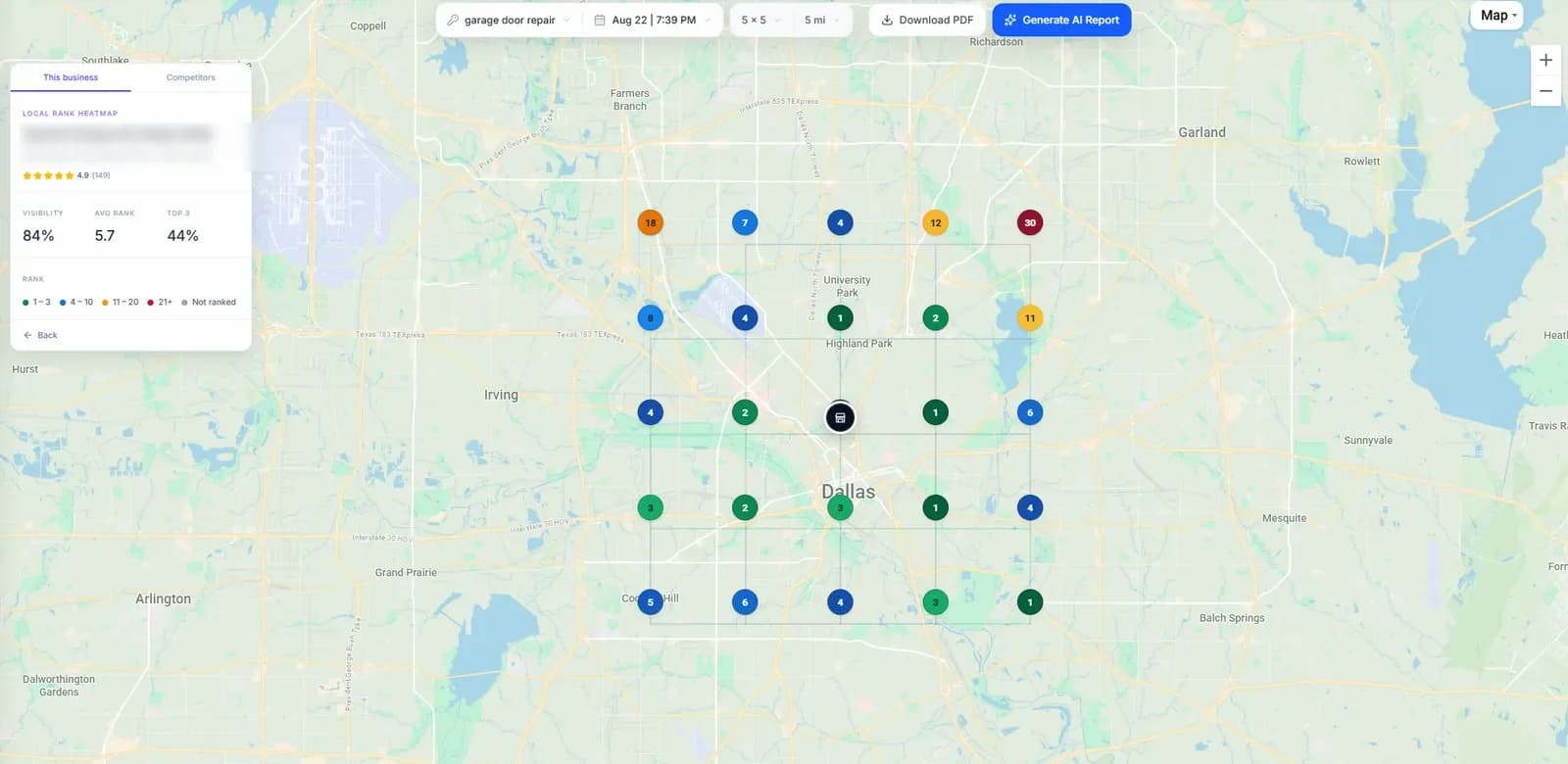
A geo-grid scan places a grid of points over the area around your business and checks your ranking from every one of them. The result is a map you can read in seconds: green where customers see you first, red where they barely see you at all.
- Pick a grid from 3 × 3 (9 points) up to 21 × 21 (441 points) and a radius from 0.1 to 100 miles.
- Each point is a separate Google Maps search for your keyword from that exact coordinate.
- Rankings are plotted as a colour-coded heatmap, so strong and weak areas stand out at a glance.
- Remove points you don't serve, such as lakes or areas outside your service area, before you run the scan. You only pay for the points you keep.
How to read a GridBeacon heatmap
- Rank 1–3: In the map pack: the top three results
- Rank 4–10: Still on the first page of results
- Rank 11–20: Visible, but only if someone scrolls
- Rank 21+: Rarely seen by searchers
- Not ranked: Not in the results at that point
- Visibility
- The share of grid points where the business appears in the top 10.
- Average rank
- The business's mean position across the points where it appears.
- Top 3
- The share of points where it is in the map pack.
Competitor grid
See Who Is Outranking You
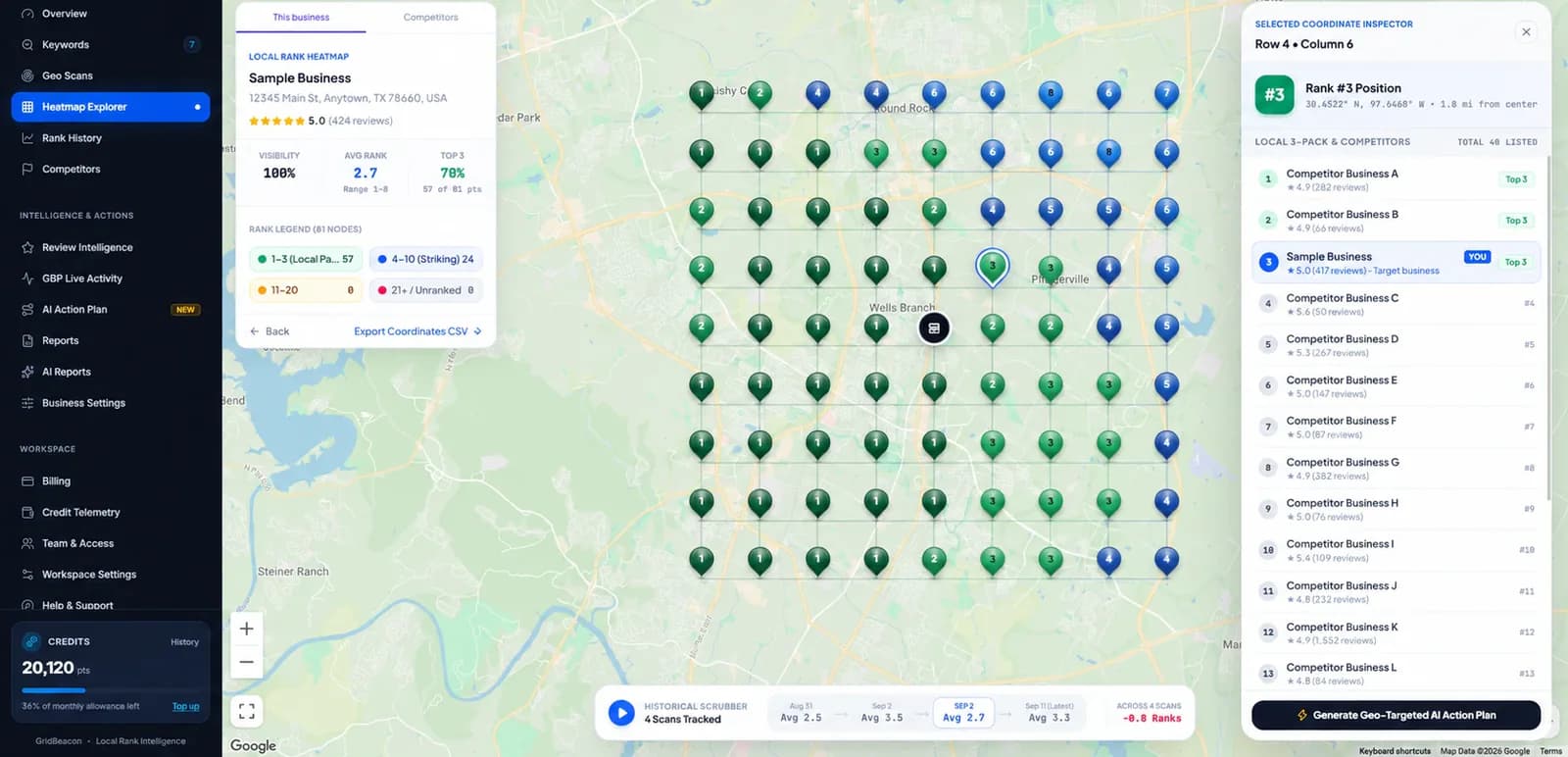
Every scan records the full local results at every point, not just your own position. Competitor data comes from the scan you have already run, so looking at it costs no extra credits.
- Click any point to see the local competitors ranked there and where you sit among them.
- The Competitors tab lists the businesses seen across the scan, with their average rank and how many points they beat you at.
- Open any competitor's grid to see the areas where they dominate and the areas where they are weak.
- Compare share of visibility across competitors and export the results to CSV.
Gap view
Find Local Ranking Gaps
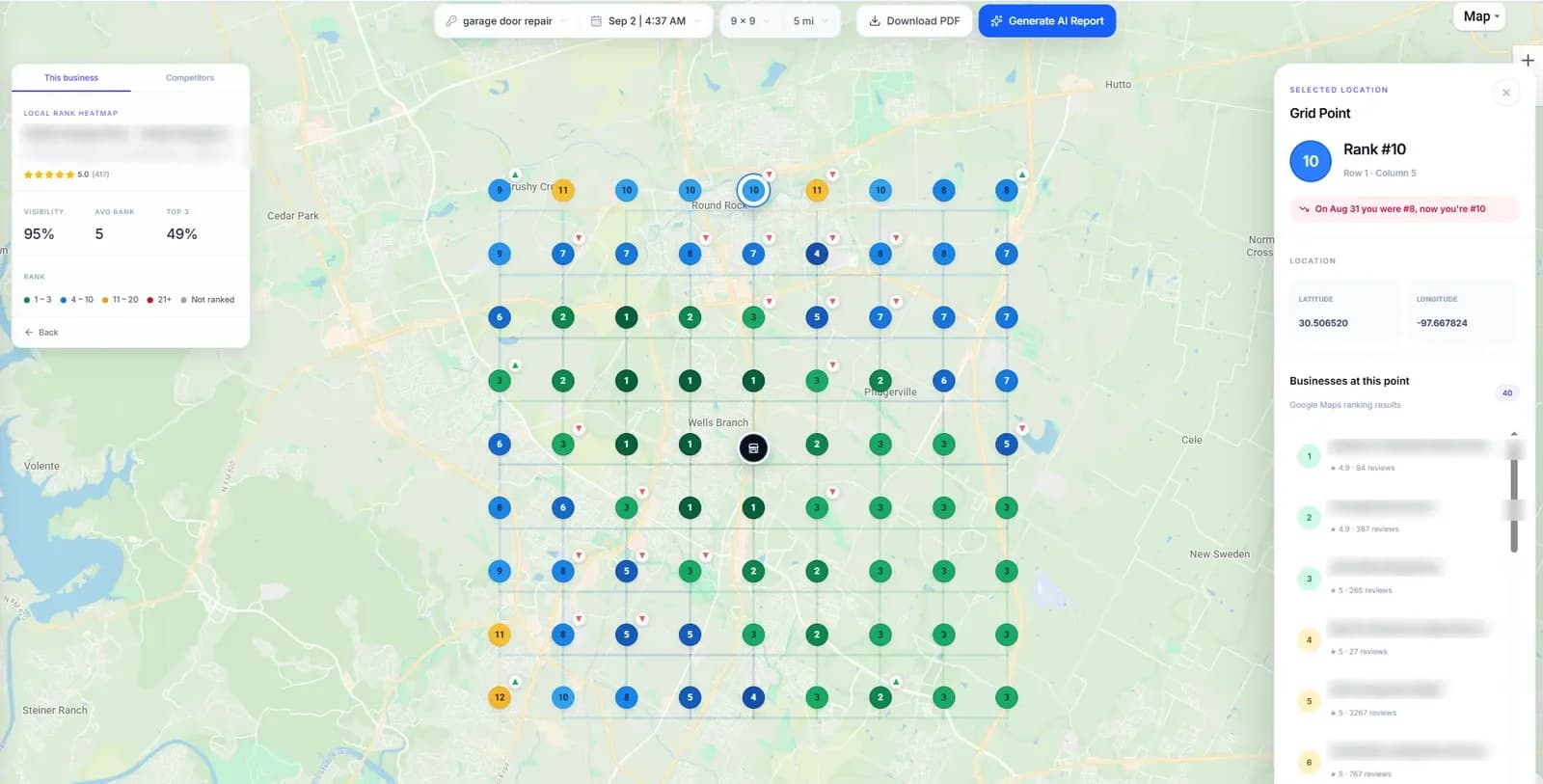
Once you pick a competitor, the heatmap can switch between your grid, their grid and a Gap view. The Gap view compares the two point by point: green where your business ranks higher, red where the competitor does.
That turns a vague “they're beating us” into specific places on the map, such as the neighbourhoods furthest from your address or the side of town where a competitor is based. Those are the areas that may deserve attention next.
- Find locations where a competitor ranks strongly and you don't.
- Spot where you already lead, so you can protect those areas.
- Use the same comparison after your next scan to see whether the gap closed.
- You rank higher
- Competitor ranks higher
- Level
Rank history
Track Ranking Changes Over Time
One scan tells you where you stand today. A history of scans tells you whether things are getting better, and where.
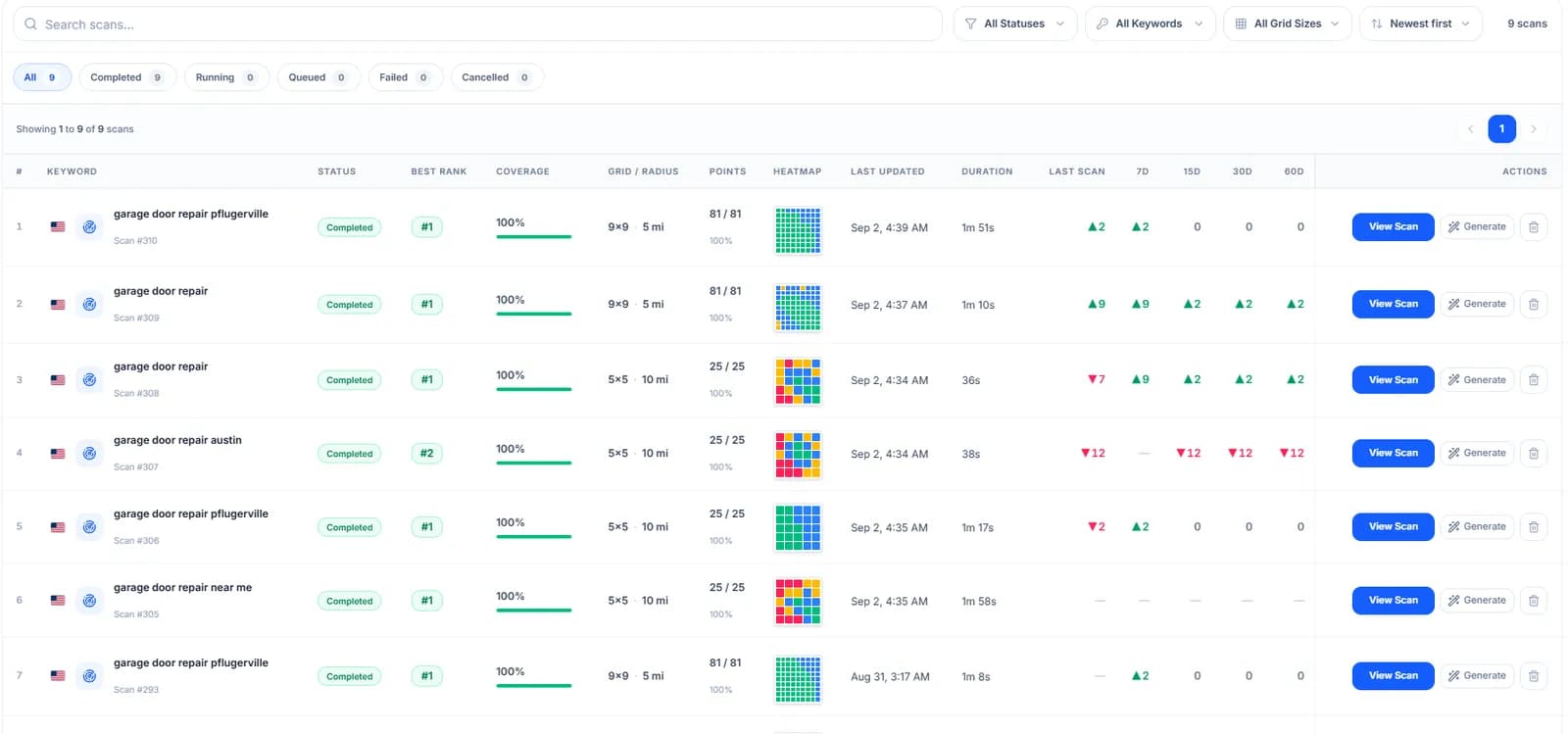
- Every completed scan is saved with its grid, radius and results.
- Compare a scan with an earlier one and see which points moved up or down.
- Follow movement for each keyword over the last 7, 15, 30 and 60 days.
- Use the history to measure local SEO work: whether changes to a profile, website or reviews lined up with better rankings.
AI Ranking Intelligence reports
Turn Ranking Data Into Actionable Insights
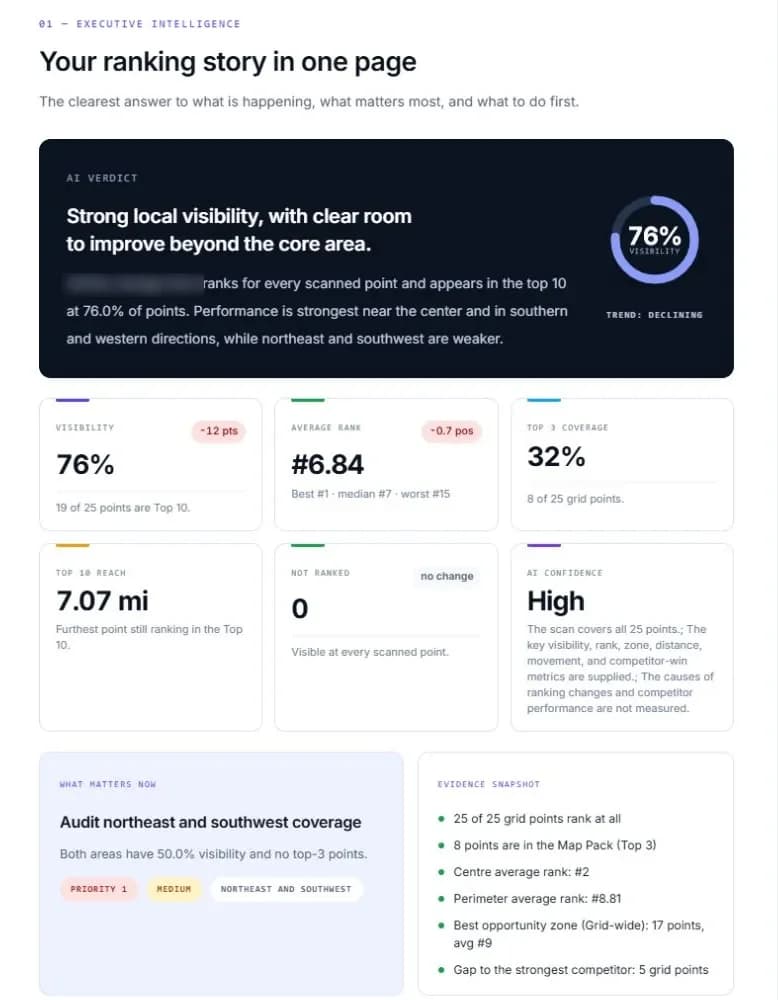
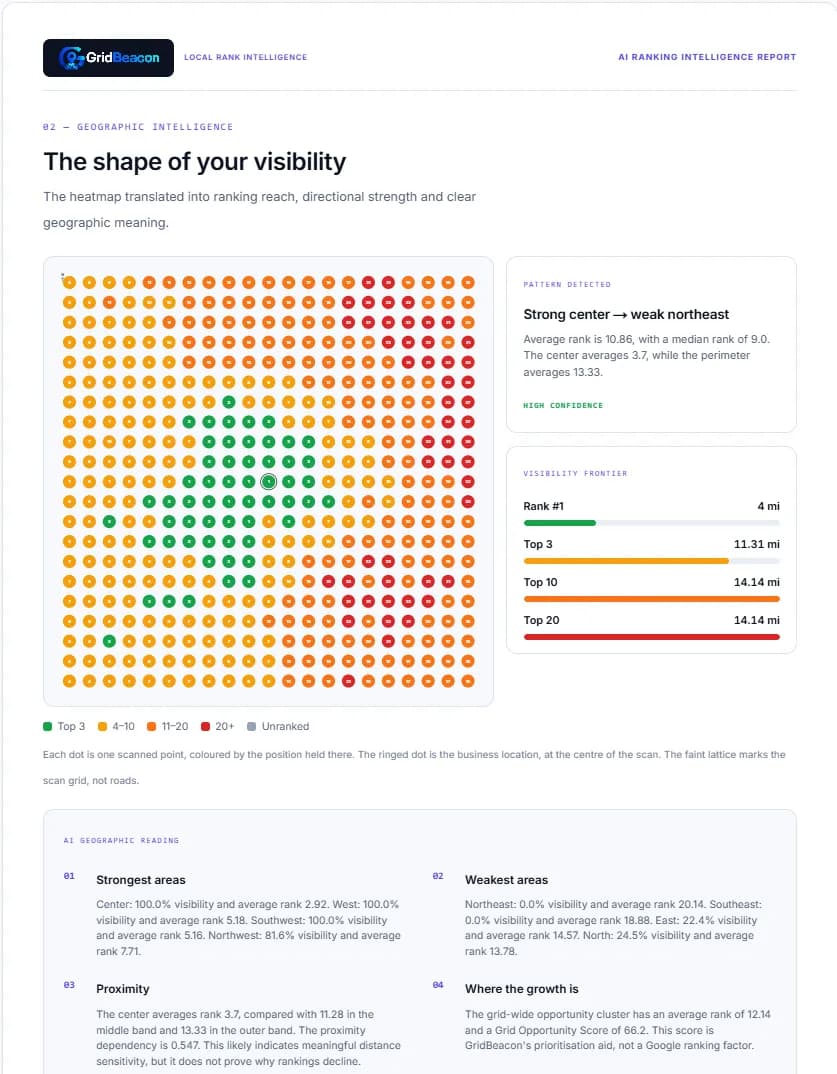
On paid plans, any completed scan can become an AI Ranking Intelligence Report: a PDF that explains in plain language what the scan shows and what to look at first.
- A scan summary: visibility, average rank, top-3 coverage and how far from the business you still rank in the top 10.
- Ranking observations: your strongest and weakest areas, by direction and distance.
- Competitor insights: who is ahead of you, and where.
- Opportunities: prioritised next steps, each tied to evidence from the scan.
- A PDF you can download and share with a client or your team.
The report explains what the scan data shows; it can't guarantee ranking changes. Its opportunity scores are GridBeacon's way of prioritising, not Google ranking factors. Each report uses 100 credits.
Scheduled scans
Monitor Rankings Without Running Every Scan Manually
On paid plans, any keyword can be scanned on a schedule, so your ranking history builds up without anyone remembering to press the button.
Pick a schedule
Run a keyword's scan daily, weekly, every two weeks or monthly, with the same grid and radius each time.
Get alerted
Email alerts when rankings change sharply or credits run low, sent to you and any extra recipients you add.
Keep the history
Each scheduled run is saved like a manual scan, ready to compare with the ones before it.
Scheduled scans are available on paid plans and use credits in the same way as a manual scan.
For agencies
Built for Local SEO Agencies
Clients rarely trust a single ranking number, and they shouldn't. GridBeacon gives agencies a map of where each client ranks, who is ahead of them and how that changes month to month.
- Track multiple client businesses and keywords in one workspace.
- Prove ranking changes with saved scans and trend views.
- Show visual results instead of spreadsheets.
- Monitor each client's local competitors.
- Send AI report PDFs as part of your reporting.
- Schedule repeat scans for every client.
Many businesses
Unlimited businesses and keywords on paid plans.
Visual results
Heatmaps clients understand without an SEO glossary.
Proof over time
Before-and-after scans and movement by keyword.
Team access
Invite colleagues into the same workspace.
For local businesses
Understand Where Customers Can Actually Find You
If customers find you through Google Maps, your ranking in each neighbourhood decides who gets the call. GridBeacon suits any business that serves a local area, for example:
Garage door companies
Check you appear across the suburbs you drive to, not just near the shop.
Locksmiths
Emergency searches favour whoever is closest. Find where you drop out.
HVAC companies
See how far your visibility reaches during busy seasons.
Roofers
Compare your coverage with the crews competing for the same jobs.
Plumbers
Spot the neighbourhoods where “plumber near me” sends people elsewhere.
Dentists
Understand which parts of town see your practice first.
Law firms
Check visibility for practice-area searches across the city.
Other local services
Cleaners, electricians, movers and more: anyone customers search for nearby.
How it works
Track Google Maps Rankings in Four Steps
Add your business
Find it on Google Maps by name and GridBeacon brings in its location and profile details.
Add the keywords you want to track
Use the searches customers actually type, such as “emergency plumber” or “garage door repair”.
Choose your grid and scan area
Pick the grid size and radius, remove points you don't serve, and see the exact credit cost before you run it.
View rankings across the map
Open the heatmap, click into any point, compare competitors and keep the scan in your history.
What's included
Everything You Need to Track Google Maps Rankings
Scanning, competitor grids, the Gap view and history work on every plan. Features marked “Paid plans” need a Starter, Professional or Agency subscription.
Geo-grid rank tracking
Grids from 3 × 3 to 21 × 21 and a radius from 0.1 to 100 miles.
Competitor grids
The full local results at every point, with no extra credits.
Gap view
Your grid against a competitor's, point by point.
Rank history
Compare scans and follow movement over 7 to 60 days.
AI Ranking Intelligence reports
Plain-language PDF reports built from a scan.
Scheduled scans and alerts
Daily to monthly scans, with email alerts when rankings move.
GBP Activity monitoring
Keep track of activity on a Google Business Profile over time.
Review Intelligence
Analyse up to 500 Google reviews for a business.
Credit-based scanning
One credit per grid point, 500 free credits to start and top-ups when you need them.
Straight answers
What You Can Count On
No credit card to start
New accounts get 500 scan credits. Upgrade only if you need more.
Transparent credits
One credit per grid point, and the cost is shown before every scan.
Real Google Maps results
Each point is a Google Maps search for your keyword from that coordinate.
Real screenshots
Every product image on this page comes from actual GridBeacon scans.
Secure payments
Billing runs through Paddle, so GridBeacon never stores your card number. Security
A person answers
Questions go to our support team. Contact us
FAQ
Google Maps Rank Tracking Questions
What is a Google Maps rank tracker?
A tool that checks where a business appears in Google Maps results for the searches its customers use. GridBeacon checks from many points across a service area rather than one, so you can see the areas where you rank well and the areas where you don't.
How does geo-grid rank tracking work?
You choose a grid (from 3 × 3 up to 21 × 21 points) and a radius around your business. GridBeacon runs your keyword as a separate Google Maps search from each point's coordinates, records the results and plots your position at every point as a colour-coded heatmap.
Why does my Google Maps ranking change by location?
Google ranks local results on relevance, prominence and distance from the person searching. As the searcher moves, distance changes and so does the set of nearby competitors, which is why a business can be first in one neighbourhood and missing a few miles away.
Can I track competitors with GridBeacon?
Yes. Every scan records the businesses Google Maps showed at each point, so you can open any competitor's grid, see how many points they beat you at and compare the two in the Gap view. That comes from the scan you already ran and uses no extra credits.
Can I track multiple keywords?
Yes. The free plan covers one business and three keywords. Paid plans track unlimited businesses and keywords; every scan uses credits based on its grid size.
How much does a scan cost?
One credit per grid point, and you see the cost before you run it. A 5 × 5 scan uses 25 credits and a 21 × 21 scan uses 441. New accounts start with 500 free credits; see pricing for plan allowances and top-ups.
How often should I run a Google Maps ranking scan?
It depends on how much is changing. During active local SEO work, weekly scans show whether changes are having an effect; for steady monitoring, every two weeks or monthly is usually enough. Paid plans can schedule scans so they run on their own.
Can agencies use GridBeacon for clients?
Yes. Agencies track each client as its own business, share heatmaps and AI report PDFs with clients, schedule repeat scans and invite team members into the same workspace on paid plans.
What is the difference between a normal rank tracker and a geo-grid tracker?
A normal rank tracker reports one position for a keyword, usually from a single location. A geo-grid tracker reports your position at many locations at once, so you see how rankings change across the area your customers search from.
See Where Your Business Really Ranks on Google Maps
Track rankings across a geo-grid, compare competitors and monitor your local visibility with GridBeacon.
No credit card required.