
Local SEO competitor analysis
See Who Beats You on Google Maps, and Where
The businesses above you in the map pack aren't the same across your whole area. GridBeacon records every business Google Maps returns at every point of your grid, then shows who controls each part of the map, where they beat you, and how their profiles compare with yours. It all comes from the scan you already ran.
No credit card required. New accounts get 500 free scan credits.
- No extra credits for competitor data
- Gap view against any competitor
- Profile comparison
What it should answer
Five Questions a Local Competitor Analysis Should Answer
A list of competitor names is not an analysis. To decide what to do next, you need answers to these:
Who outranks me?
The businesses that take the map pack spots you want, ranked by how much of your area they control.
Where do they win?
The neighbourhoods or directions where a competitor ranks above you, and where you still lead.
For which keywords?
A competitor that dominates “emergency plumber” may be weak on “water heater repair”.
Why are they ahead?
Ratings, review count and pace, categories, photos and profile completeness, set side by side.
Is it changing?
Who gained or lost ground since the last scan, and whether your share of the map is growing.
In GridBeacon
Competitor Analysis Tools Built Into Every Scan
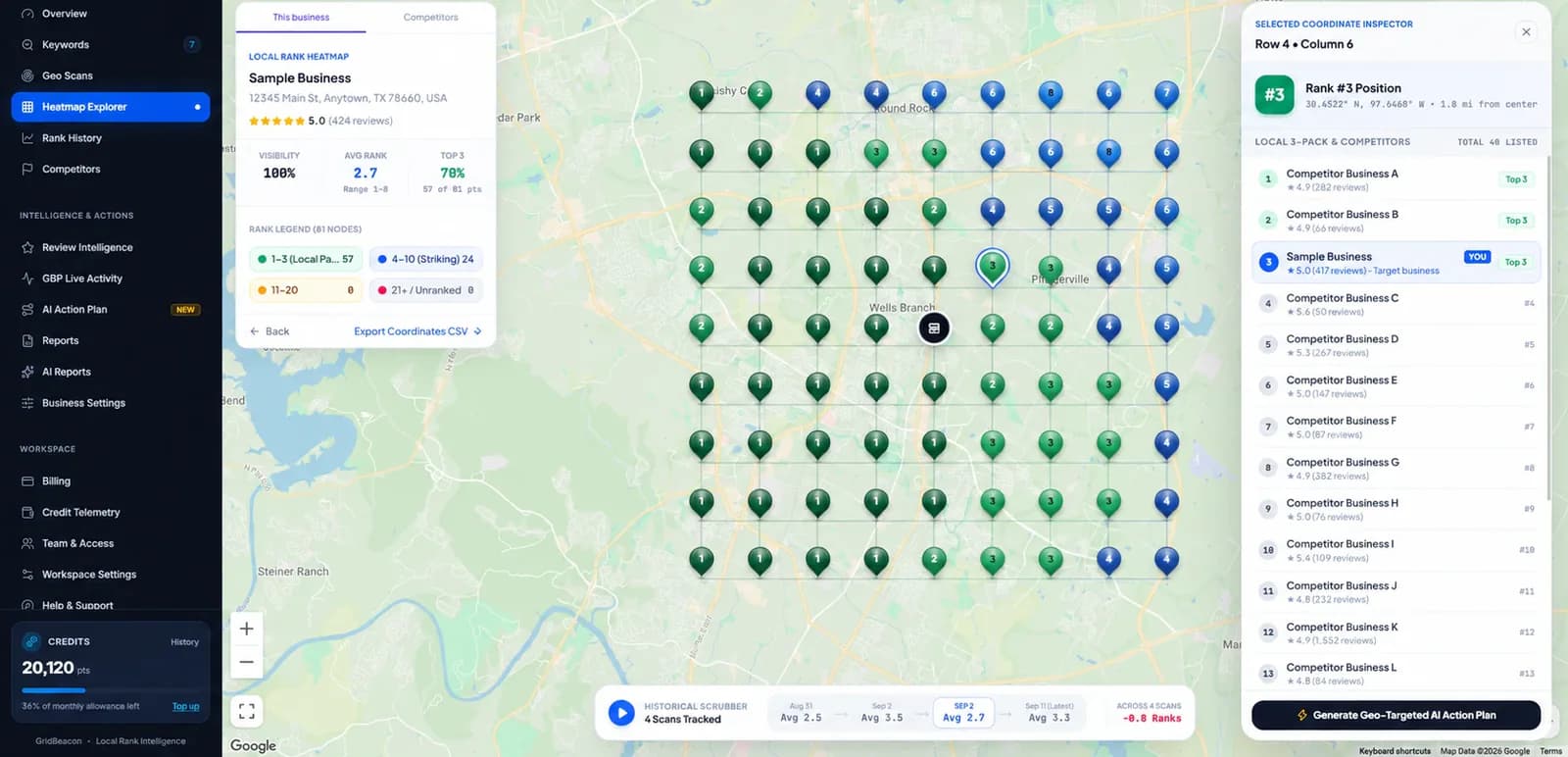
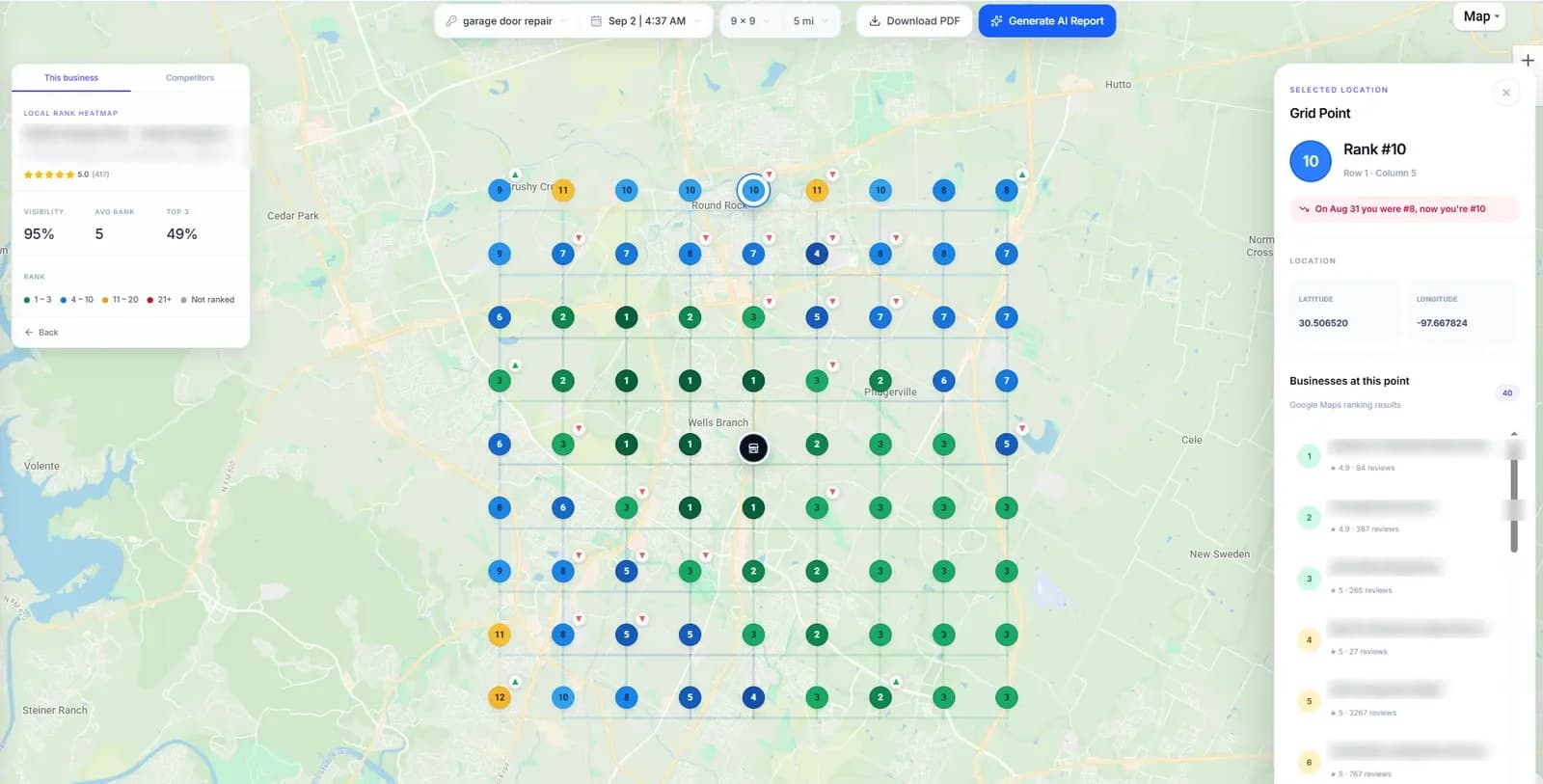
- Point inspector. Click any grid point for the full list of businesses Google Maps ranked there.
- Competitor grids. Open any competitor from the scan as its own heatmap.
- Gap view. Your grid against theirs, point by point: green where you lead, red where they do.
- “Beats you at N of M”. For each competitor, how many of the points where it appears it ranks above you.
Local Competitor Leaderboard
Every business found in your scans, ranked by how well it performs across your grid.
Share of Local Visibility
How much of the map each business controls, based on who wins each grid point.
Geographic Competitor Coverage
Which competitor holds the top spot at each point, so you can see territory, not just totals.
Keyword Battle
Who dominates each tracked keyword, you and your chosen competitors side by side.
Biggest Competitor Changes
Who gained and who lost ground since the previous completed scan.
Business Profile Comparison
Rating, reviews, reviews gained in 30 days, categories, photos and profile completeness.
Head-to-Head
Your business against the strongest competitor detected in your scans.
Visibility Over Time
How visibility in your area has moved across past scans.
Watched competitors
Pin the competitors you care about and filter the page down to them.
Step by step
How to Run a Local SEO Competitor Analysis
Scan your main keywords
Use the grid size and radius that match your service area, one scan per keyword that brings calls.
Find who controls the map
Check the leaderboard and Share of Local Visibility to name the two or three competitors that matter.
Map where they win
Open each one's grid and the Gap view to see the exact areas they take from you.
Compare the profiles
Line up ratings, review pace, categories and photos to spot what they have that you don't.
Repeat the scans on a schedule. A single scan shows a moment; Biggest Competitor Changes and Visibility Over Time only mean something across several.
What to do with it
Turning Competitor Findings Into Actions
Common patterns, what they usually mean, and where to look first. None guarantees a ranking change, but each points you at the likeliest cause.
| What you see | What it often means | Where to look first |
|---|---|---|
| A competitor wins most points near you | Their profile is a better match for the keyword | Primary and secondary categories, services, business description |
| They win one side of town only | They are based closer to those customers | Distance can't be changed; focus on the areas you can win and on prominence |
| They gained ground since last scan | Recent activity on their profile | Their review count and 30-day review growth, new photos |
| Far more reviews than you | Prominence gap | A steady review-request routine with your customers |
| Similar profiles, but they rank higher | Signals outside the profile | Their website, local links and citations |
FAQ
Local Competitor Analysis Questions
What is local SEO competitor analysis?
It is finding out which businesses outrank you in local search, where in your area they do it, for which keywords, and what they have that you don't, such as more reviews, better-matched categories or a location closer to your customers. For Google Maps, it works best on a geo-grid, because the competitors ranking above you change from one part of town to another.
How do I find out who my local competitors are?
Search your main keywords on Google Maps from several places across your service area and note which businesses appear in the map pack. A geo-grid scan does this automatically: GridBeacon records every business Google Maps returns at every grid point and ranks them in a competitor leaderboard.
Does competitor analysis cost extra credits in GridBeacon?
No. Every scan already records the full local results at each point, so competitor grids, the Gap view, the leaderboard and the Competitors page use data you have paid for once. You only spend credits on the scan itself.
What does the Gap view show?
After you pick a competitor on a scan, the Gap view compares your rank with theirs at every point: green where you are ahead, red where they are. Alongside it, GridBeacon shows each competitor as “beats you at N of M”: of the M points where it appears, the N where it ranks above you.
Can I compare my Google Business Profile with a competitor's?
Yes. The Competitors page compares your profile with competitors' on rating, number of reviews, reviews gained in the last 30 days, categories, photos and profile completeness.
Do my competitors know I am tracking them?
No. GridBeacon reads public Google Maps results. Nothing is sent to the businesses you track and no access to their profiles is needed.
Find Out Who's Taking Your Map Pack Spots
Scan your main keyword on 500 free credits and see every competitor at every point of your area.
No credit card required.