
Methodology
How GridBeacon Checks Your Google Maps Rankings
A ranking number is only useful if you know how it was measured. This page explains exactly what happens in a GridBeacon scan: where the grid points go, how each Google Maps search is made, how your business is found in the results, and how the summary figures are calculated.
No card and no account needed.
- One real Maps search per point
- Matched by Google place ID
- Published formulas
Updated November 2026
Step 1
Where the Grid Points Go
A centre and a radius
Every scan starts from a centre, usually the business's map pin, and a radius from 0.1 to 100 miles. Service-area businesses with a hidden address set the centre themselves.
Evenly spaced points
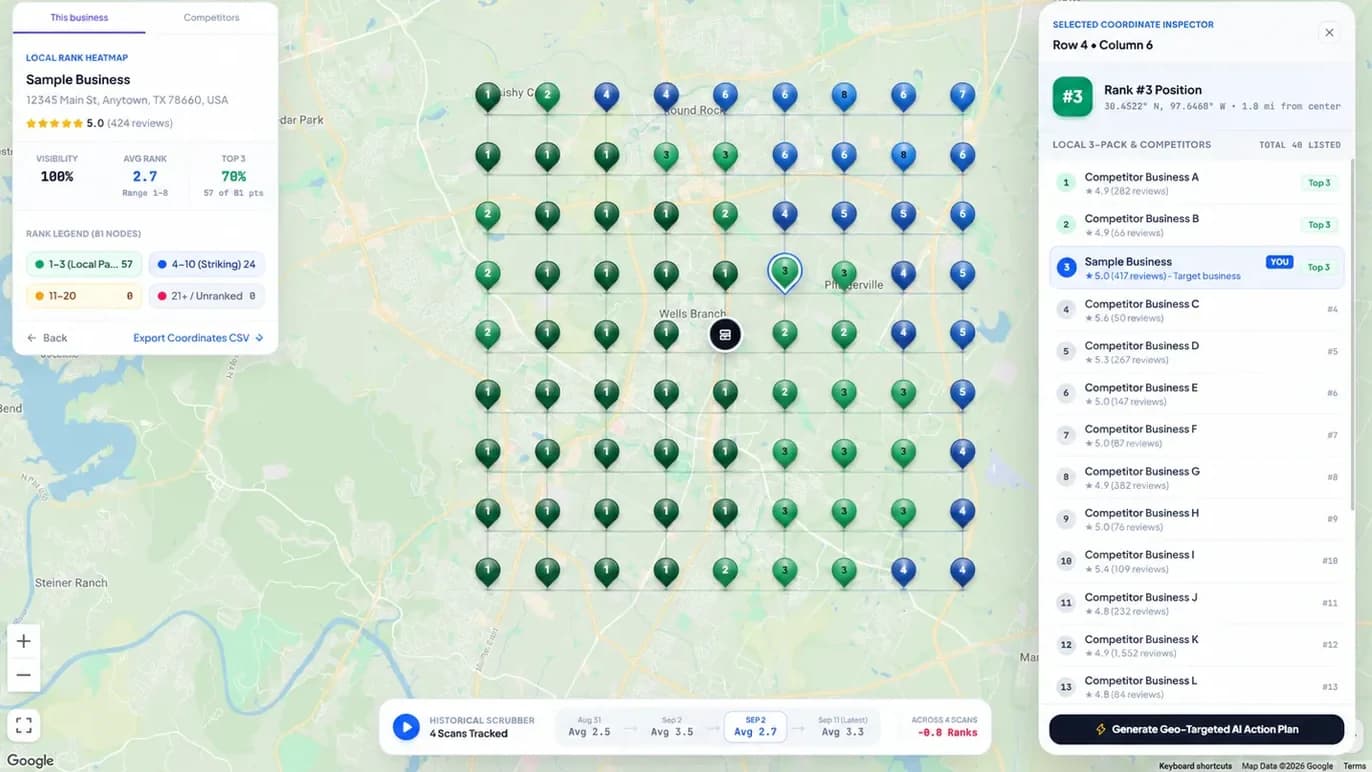
A square grid from 3 × 3 (9 points) to 21 × 21 (441 points) is laid over that area. Points are radius ÷ ((size − 1) ÷ 2) miles apart, so a 9 × 9 grid over 4 miles puts them 1 mile apart.
Rings instead of rows
The ring layout places points on circles around the centre instead, for areas that spread evenly in every direction.
Points you leave out
Custom scan areas let you exclude points over water or outside your service area. Excluded points are not searched and not charged.
Step 2
How Each Google Maps Search Is Made
Each active point becomes its own Google Maps search, sent through a specialised search-data provider. One point, one search, one credit.
| Setting | Value | Why |
|---|---|---|
| Location | The point's exact latitude and longitude (7 decimal places) | The search happens where the point is, not from an IP address or ZIP code |
| Map zoom | Chosen from the radius: zoomed in for small areas (up to 0.5 mi), further out for large ones (over 8 mi) | Matches the map view a searcher would have at that scale |
| Search area | Results for the visible map area | Mirrors how Maps lists businesses for the area in view |
| Language | English | Kept fixed so two scans ask the same question |
| Device | Desktop | Kept fixed for the same reason |
| Keyword | Exactly as you typed it | “plumber” and “plumber near me” are different searches |
Step 3
How Your Business Is Found in the Results
The results are stored
For each point, GridBeacon keeps the businesses Google returned there, in order, with ratings and review counts.
Your listing is matched by place ID
Google gives every listing a place ID. GridBeacon finds yours by that ID, and uses the business name only for results without one, so a similarly named competitor is not counted as you.
A position or 'not ranked'
If your listing is in the list, its position is recorded. If it is not among the results captured, the point is marked not ranked.
Competitors come free
Because every business at every point is stored, any competitor's grid and the Gap view are built from the same scan without another search.
Step 4
How ARP, ATRP, SoLV and Visibility Are Calculated
Every summary figure comes from the ranks at the scan's points. Here are the formulas, so you can check any number by hand.
| Metric | Formula | Example: 25 points, ranked at 20 |
|---|---|---|
| ARP (Average Rank Position) | Mean rank over the points where the business ranks | Ranks at the 20 ranked points average 4.0 → ARP 4.0 |
| ATRP (Average Total Rank Position) | Mean rank over every point, counting each not-ranked point as 21 | (20 × 4.0 + 5 × 21) ÷ 25 → ATRP 7.4 |
| SoLV (Share of Local Voice) | Percentage of all points where the business is in the top 3 | 8 points in the top 3 → 8 ÷ 25 = 32% |
| Visibility | Percentage of all points where the business is in the top 10 | 18 points in the top 10 → 72% |
Honest limits
What a Scan Does Not Tell You
- How many people searched, saw your listing or called. Rankings are not traffic or leads.
- What one particular customer sees: their exact spot, phone and history can differ from a grid point.
- Why a ranking changed. A profile edit before a drop is a clue, not proof.
- Results between the points. A grid samples the area; a denser grid samples it more finely.
- Positions below the depth the scan collected; those points show as not ranked.
Google ranks local results on relevance, distance and prominence, as described in its local ranking help page. Distance is measured from the searcher, which is why a grid of searches shows more than any single one.
FAQ
Ranking Method Questions
Are GridBeacon's rankings real Google Maps results?
Yes. Each grid point is its own Google Maps search for your keyword, requested through a specialised search-data provider at that exact coordinate. GridBeacon records the results Google returned there; it does not estimate or model positions.
Why does GridBeacon show a different rank from what I see on my phone?
Your own search uses your exact location, your device and sometimes your search history. A GridBeacon point searches from the grid coordinate, in English, on a desktop-style request with no personal history. A few hundred metres, a different device or a later time can all change the map pack, so compare scans with scans rather than with one personal search.
What does 'not ranked' mean on a GridBeacon heatmap?
The business was not in the results captured at that point. It may appear further down the list, but beyond the depth the scan collected. For ATRP, a point like that counts as rank 21, the usual convention for local grids.
How does GridBeacon know which result is my business?
It matches the business by its Google place ID, the identifier Google gives each listing, and falls back to the business name only when a result has no ID. That keeps a competitor with a similar name from being counted as you.
Can I compare two scans with different settings?
You can open them side by side, but the numbers are only comparable when the keyword, centre, grid size, radius and excluded points match. Rank MRI enforces this: it only compares scans that asked the same question.
Is a scan the same as a search a customer makes?
It is a close stand-in, not a copy. A scan shows what Google Maps returned at each point when it ran. It does not measure how many people searched, saw your listing or called you.
Check the Method on Your Own Business
Run a free 3 × 3 check, or create an account with 500 free credits and open any point to see the full list Google returned there.
No credit card required.