
Rank MRI
See What's Different Where You Rank Poorly
A heatmap shows where you are weak. Rank MRI helps you work out what to look at next. Click any point to see who outranks you there and how you compare, then turn weak areas into a plan your team can work through.
Rank MRI is included on every paid plan. It uses no credits.
- Works from your existing scans
- No credits to analyze
- No profile access needed
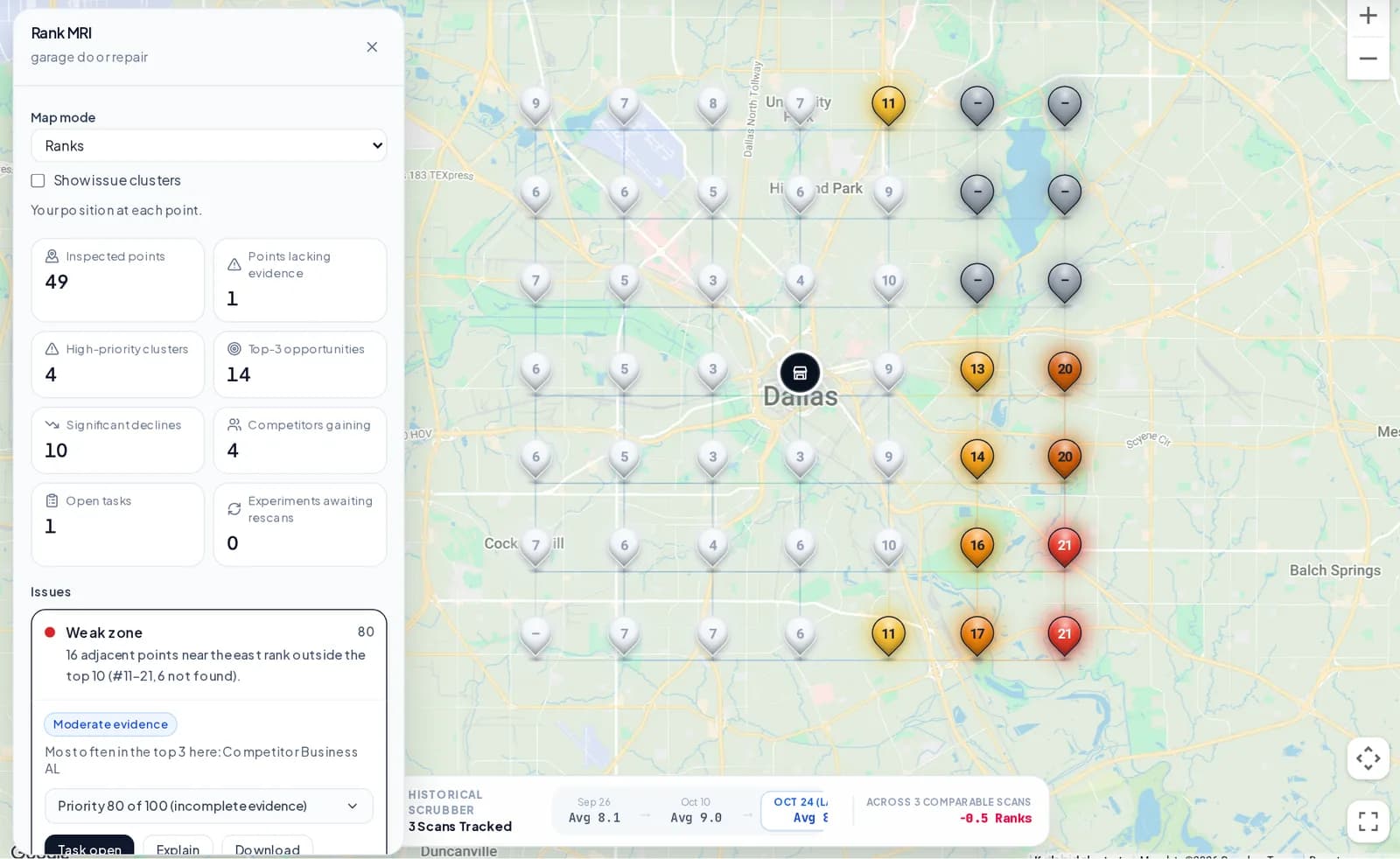
What it shows
From a Red Pin to Something You Can Act On
Every finding is worked out from your scan before any AI is involved, and says how strong the evidence is.
Every point, explained
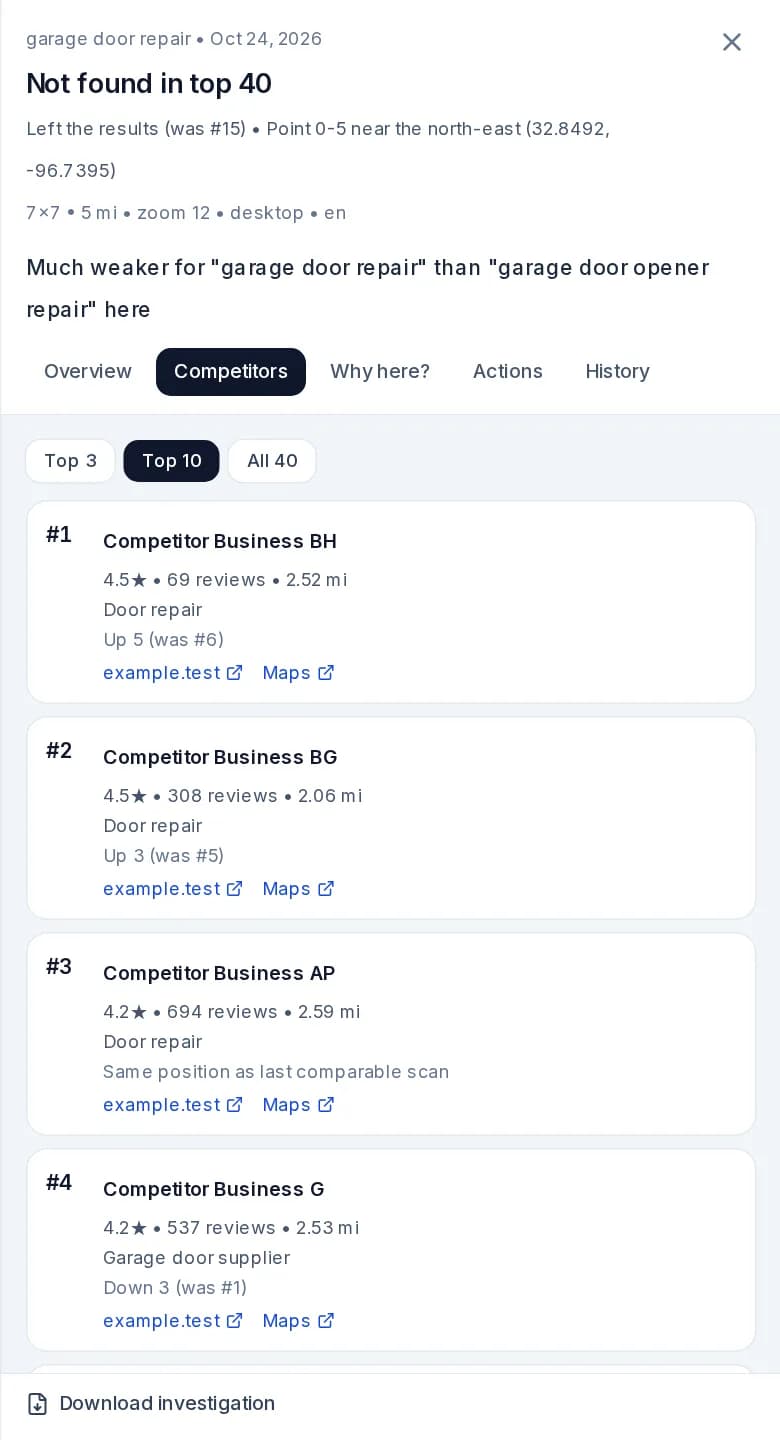
Your rank, who is ahead of you, their reviews, ratings and categories, and how the point has moved.
Issues, not 49 red pins
Neighbouring points with the same pattern become one issue, so your team gets one job instead of dozens.
Next wins
Points where you sit at #4-6, just outside the top 3, shown as candidates to investigate.
Competitor movement
Which listings have moved ahead of you, and where, between two comparable scans.
Keyword gaps
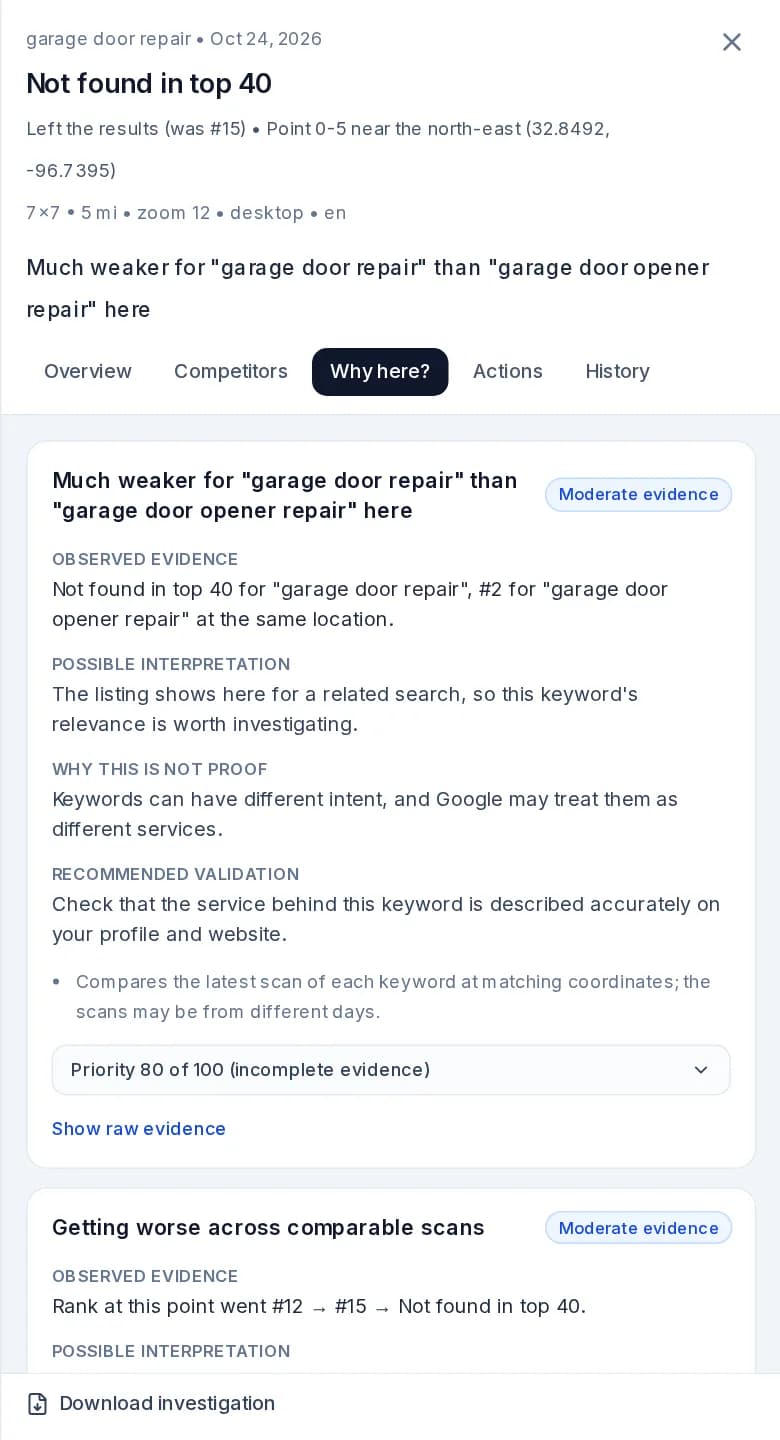
Places where you rank well for one keyword and poorly for a related one at the same location.
Evidence you can check
Each finding shows what was observed, what it might mean, why it is not proof and how to verify it.
How it works
From Scan to Plan in Four Steps
Open a completed scan
Choose Rank MRI on the heatmap. The analysis is usually waiting for you, and it uses no credits.
Click a point or an issue
See who ranks there and what is different, or start with the issues list, highest priority first.
Create a task
Turn an issue into work with an owner, a due date, notes and files. Points in the same issue share one task.
Record the change, then rescan
Log what you did and when. Later scans of the same grid are measured against how things looked before.
Reading a finding
Evidence First, Not a Black Box
Rankings have many causes, and nobody outside Google can see them. So Rank MRI never presents a guess as a fact.
- Observed evidence: the facts from your scan.
- Possible interpretation: what it might mean, in plain English.
- Why this is not proof: what the evidence cannot show.
- Recommended validation: how to check before you act.
"Not found in top 40" stays exactly that. Rank MRI never turns a missing result into a rank, and a failed point is reported as a measurement problem rather than a ranking one.
Tasks and experiments
Keep the Work and the Results Together
SEO tasks
Assign an issue to a teammate with a priority, due date, comments and files. Every change is kept in an activity log.
Priorities you can edit
Issues are ordered by a score you can open up and adjust. It shows what to look at first, not a chance of success.
Experiments
Record what you changed and when, choose target points, and add comparison points you do not expect to move.
Before and after
Later scans of the same grid are compared location by location, with a note of anything that weakens the comparison.
Experiments show what happened after a change, not that the change caused it. Rankings move for many reasons, so comparison points show whether the whole area moved anyway.
Client reports
Evidence You Can Hand to a Client
Download a PDF for a single point, one issue or the whole scan, with the map, the findings, the work done and the limits of the evidence.
- Point, issue and full-scan reports, each fixed at the moment you create it.
- Your completed tasks and experiment results alongside the findings.
- Your own logo and colours on the Agency plan, through white-label reports.
Heatmap or Rank MRI?
What Rank MRI Adds to the Heatmap
| Heatmap | Heatmap with Rank MRI | |
|---|---|---|
| Question it answers | Where do I rank? | What is different here, and what should I check? |
| At each point | Your rank and the businesses in the results | Adds findings, distance, category and movement comparisons |
| Across the grid | A map of positions | Adds grouped issues, next wins and competitor movement |
| After you act | Compare with an earlier scan | Adds tasks, recorded changes and before-and-after results |
| Plans | Every plan | Paid plans |
FAQ
Rank MRI Questions
What is Rank MRI?
Rank MRI is a way of investigating a completed GridBeacon scan. Click any point on the heatmap to see who ranks there, how you compare with them and what is worth checking. It also groups weak points into issues you can assign, and tracks what happens after you make a change.
Does Rank MRI tell me why I rank where I do?
No tool outside Google can know that. Rank MRI shows what was observed, what it might mean, why it is not proof, and how to check. Every finding keeps those apart, and shows how strong the evidence is.
Does it use my scan credits?
No. Rank MRI analyzes scans you have already run, on any paid plan, so opening a point or an issue uses no credits. If you run a new scan to check a change, that scan uses your normal credits.
Does GridBeacon change my Google Business Profile?
No. Rank MRI is an analysis and planning tool, and it needs no access to your profile. Tasks record work your team plans to do. You make any changes yourself.
Will it work on my existing scans?
Yes, with less detail. Rankings, competitors, reviews and ratings work on existing scans. Competitor distance and category comparisons need a scan run after Rank MRI launched, and it tells you when something could not be compared.
Why does a competitor show "Distance unavailable"?
Distance needs a public address. Service-area businesses often hide theirs, and the map marker for a hidden address is not where the business is, so Rank MRI shows no number rather than a guess.
Can I compare two scans?
Yes, when they asked the same question: the same keyword, grid, radius and search settings, at matching locations. If two scans differ, Rank MRI says how and shows no comparison, because the difference would not be a real change.
Does the AI write the findings?
No. Every finding is calculated from your scan first, and works with no AI at all. AI can then explain the evidence in plain English. That explanation is checked against the evidence, and if it fails the calculated findings are shown instead.
Can I send the results to a client?
Yes. You can download a PDF for a single point, one issue, or the whole scan, including completed work and experiment results. On the Agency plan, these reports carry your own branding.
Stop Guessing What to Look at Next
Create a free account, run a scan, and open Rank MRI on any paid plan.
No credit card required to sign up.