
Rank tracking for HVAC
Google Maps Rank Tracking for HVAC Companies
HVAC demand flips with the weather: air conditioning searches in the heat, furnace searches in the cold. GridBeacon tracks where your company ranks on Google Maps for each of them, across your whole service area, so you're visible before the season peaks rather than after.
No credit card required. New accounts get 500 free scan credits.
- Usually a service-area business
- Cooling and heating keywords
- Scheduled scans
How customers search
The Searches That Bring HVAC Companies Work
HVAC customers search for the symptom or the job, and the two halves of the year bring different searches. Track both sets.
| Search | Why track it | What it tells you |
|---|---|---|
| ac repair | The peak summer search, often urgent. | Whether you win cooling calls when they matter most. |
| furnace repair / heating repair | The winter equivalent, just as urgent. | Your reach for heating work before the first cold snap. |
| hvac contractor | The general trade term. | Your overall visibility across the area. |
| ac installation / replacement | High-ticket jobs with longer decisions. | Whether you show up for the most valuable work. |
| heat pump installation | A growing service many competitors don't target yet. | An opportunity to own a map pack early. |
| hvac maintenance | Service plans and tune-ups that build repeat business. | Reach for recurring revenue work. |
Setting up tracking
How to Set Up Rank Tracking for an HVAC Company
HVAC companies usually serve customers at home and cover a wide area, so treat the business as a service-area business and size the grid to the area your technicians drive.
Centre
Where Google places your listing, looked up from its Maps link.
Grid
9 × 9 to 13 × 13 for a city and its suburbs.
Radius
6–15 miles, depending on how far you'll travel for a job.
Schedule
Weekly in the run-up to and during peak season; monthly otherwise.
Budget: 6 keywords on a 9 × 9 grid scanned weekly is about 2,100 credits a month, inside the Starter plan's 8,000.
Example scan
Reading a Geo-Grid Scan: What HVAC Companies Should Look For
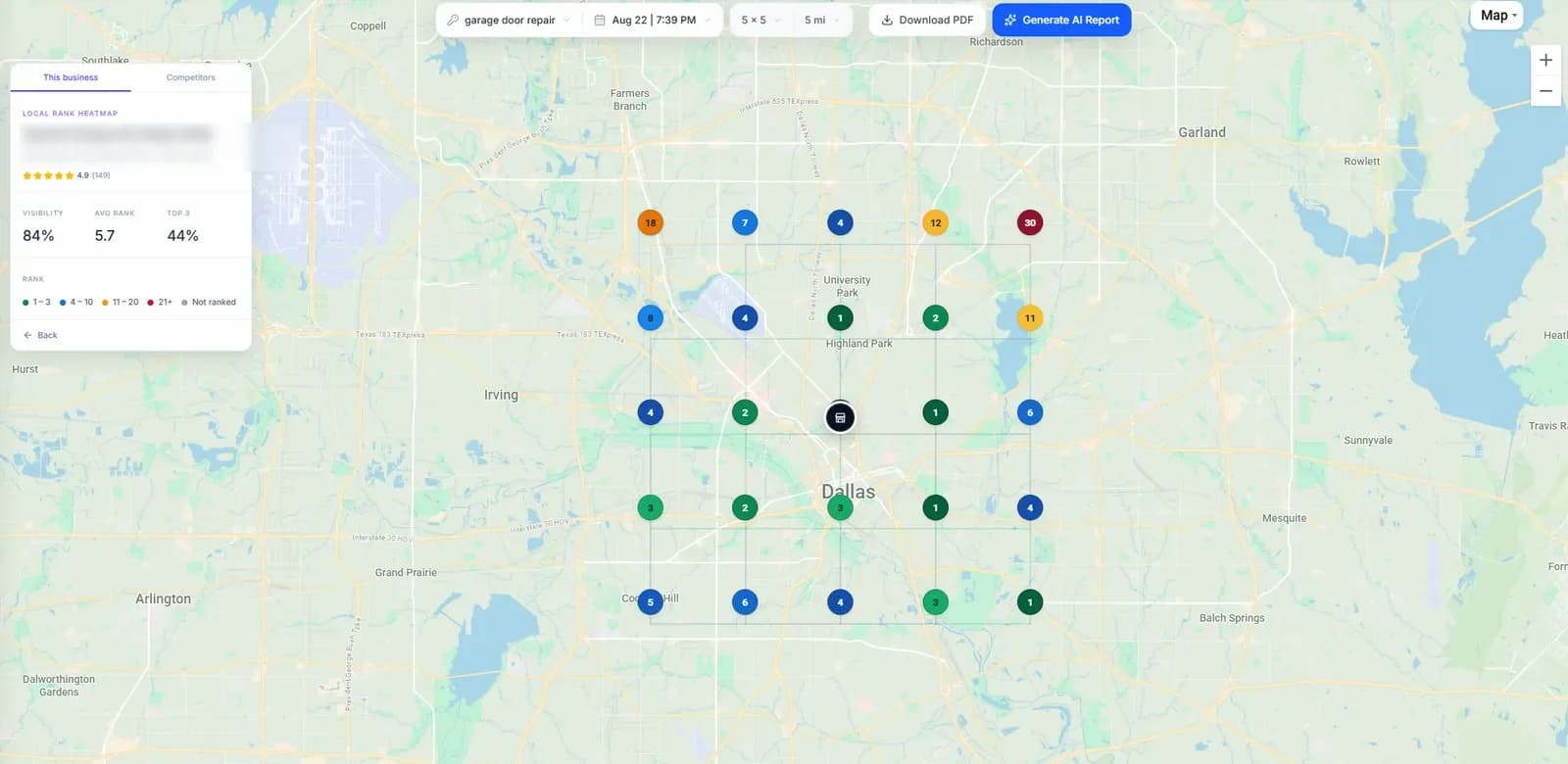
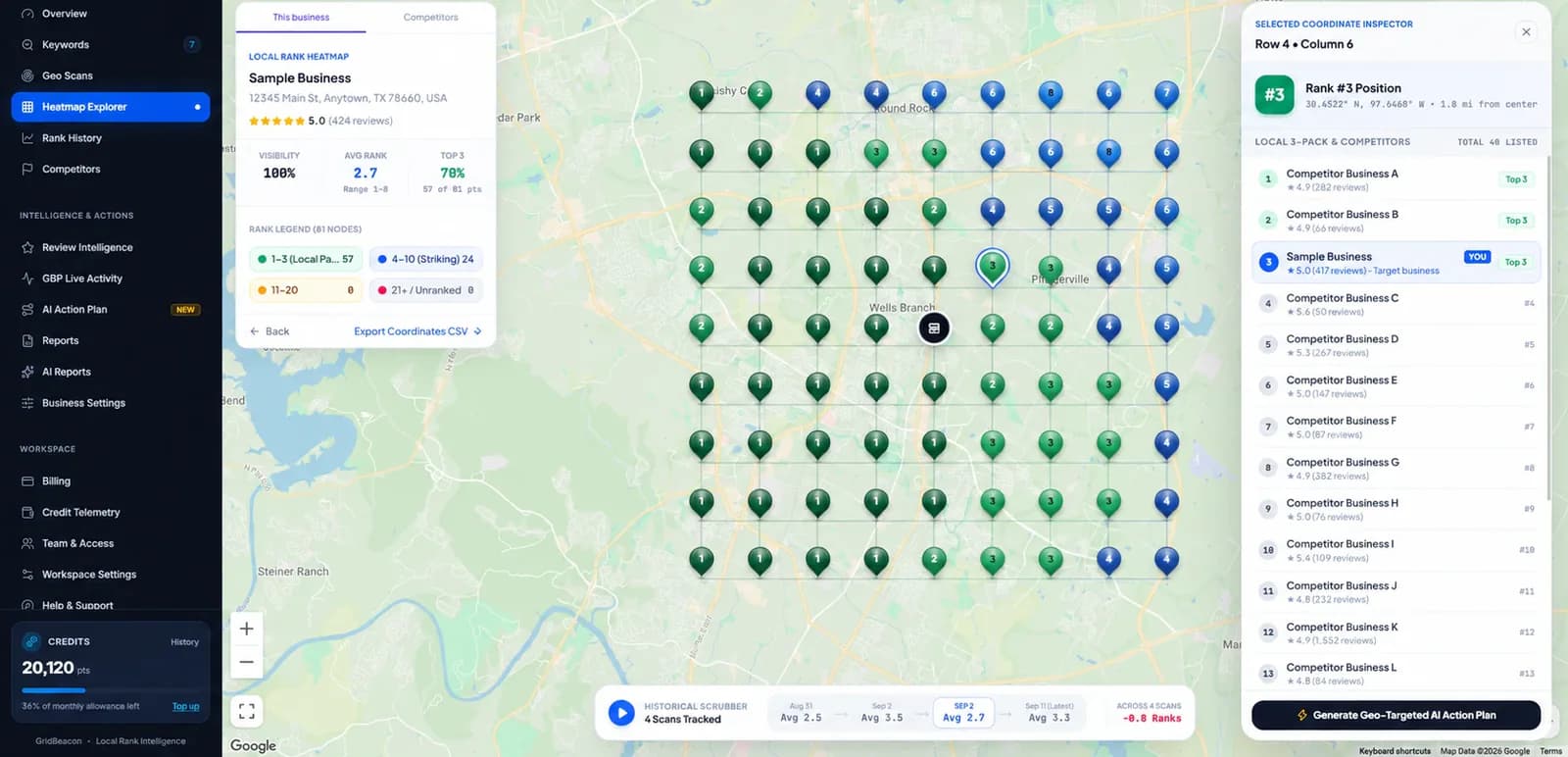
The screenshots are real GridBeacon scans of other businesses, shown as examples. When you scan your own business, look for these:
- Where the green stops: the edge of the area where customers see you in the top three.
- Which direction fades fastest: often where a strong competitor is based.
- Who holds the points you lose: select a point to see every business ranked there.
- Whether each keyword tells the same story: run the searches in the table above separately.
Run the same scan again in a week or a month, with the same centre, grid and radius, and the trend arrows show what moved.
The competition
Who HVAC Companies Compete With on Google Maps
Expect a mix of these in an HVAC map pack:
Multi-trade home services
Heating, cooling and plumbing companies competing across all your keywords.
Franchise networks
Brands with a listing in each territory and the review volume that comes with scale.
Local Services Ads
Google's ads above the map pack for many HVAC searches. They take clicks but don't change your map rank.
Equipment dealers
Businesses listed around a manufacturer brand that compete for installation searches.
Seasonal pop-ups
Newer or smaller operators that push hard in peak season. Watch the Biggest Competitor Changes list.
Neighbouring towns
Companies based outside your area whose listing sits nearer to part of your grid.
Seasonality
Tracking HVAC Rankings Through the Seasons
Rankings don't reset each season, but attention does. A simple rhythm keeps you ready for both peaks:
Before summer
Scan cooling keywords weekly from late spring, while there's still time to act on weak areas.
Before winter
Switch the weekly focus to heating keywords in early autumn.
Off-season
Monthly scans on everything, and time to work on reviews, photos and service pages.
After a heatwave or cold snap
Run an extra scan to see who gained ground while demand was high.
Diagnosis
Common Google Maps Ranking Problems for HVAC Companies
What a geo-grid usually shows when something is wrong, and where to look first. These are starting points, not guarantees.
| What the grid shows | Common cause | Where to look first |
|---|---|---|
| Strong for AC, weak for heating (or the reverse) | The profile and site lean toward one service | Services list, categories and service pages for the weaker side |
| Visibility shrinks in peak season | Competitors gaining reviews and activity faster | Biggest Competitor Changes and review pace |
| Only visible near the office | Distance from where Google places the listing | Prominence: reviews, local links, service-area content |
| Install searches much weaker than repair | Fewer signals about installation work | Installation services, photos of installs, dedicated pages |
| Nothing on the grid | Grid centred away from the listing | Centre on the listing's location |
FAQ
Rank Tracking for HVAC Companies: Questions
How do I track my HVAC company's Google Maps rankings?
Run a geo-grid scan for each main keyword, such as ac repair and furnace repair, centred where Google places your listing. GridBeacon shows your rank at every point of your service area and who ranks above you.
Should HVAC companies track heating keywords in summer?
Yes. Rankings built in the off-season carry into the peak. Scan both sets all year, and scan the in-season set more often.
What grid size suits an HVAC company?
Usually 9 × 9 to 13 × 13 with a 6–15 mile radius, depending on how far you travel. The aim is to see where your ranking fades, so the grid should reach past it.
Why do we rank well for AC repair but not furnace repair?
Google matches each search to what your profile and website say you do. If most of your content, photos and reviews are about cooling, heating searches may favour competitors who signal heating more clearly.
Do Local Services Ads change HVAC map rankings?
No. They are ads above the results and don't move your map pack position, though they do take a share of the clicks.
Be Visible Before the Season Peaks
Scan your cooling and heating keywords across your service area with 500 free credits.
No credit card required.