
Rank tracking for dentists
Google Maps Rank Tracking for Dental Practices
Patients choose a dentist close to home or work, and in most towns there are several practices within a mile. That makes dental rankings change street by street. GridBeacon shows where your practice appears in the map pack across your catchment, treatment by treatment, and which practices patients see instead.
No credit card required. New accounts get 500 free scan credits.
- Usually a storefront business
- Treatment-level keywords
- Tight, dense grids
How customers search
The Searches That Bring Dental Patients
General searches bring check-up patients; treatment searches bring the higher-value work. Track both, because the practices that win each are often different.
| Search | Why track it | What it tells you |
|---|---|---|
| dentist | The core search for new patients. | How far your everyday visibility reaches. |
| emergency dentist | Urgent visits that often become regular patients. | Whether you're found when someone is in pain today. |
| dental implants | One of the highest-value treatments. | Whether Google links your practice to implant work. |
| cosmetic dentist | Veneers, whitening and smile makeovers. | Reach for elective, higher-margin treatments. |
| pediatric dentist / family dentist | Parents search specifically. | Whether families find you, often against specialists. |
| invisalign dentist / teeth straightening | A treatment searched by name. | Visibility for clear-aligner patients. |
Setting up tracking
How to Set Up Rank Tracking for a Dental Practice
Dental practices are storefronts with a public address, and patients rarely travel far. Use a tight grid so each point represents a real neighbourhood.
Centre
Your practice address, where Google places the listing.
Grid
7 × 7 is a good default; 9 × 9 for a larger town.
Radius
1–3 miles in a city; 3–5 miles in suburbs or small towns.
Schedule
Weekly while growing, monthly once stable.
Budget: 6 treatments on a 7 × 7 grid scanned weekly is about 1,270 credits a month, inside the Starter plan's 8,000.
Example scan
Reading a Geo-Grid Scan: What Dentists Should Look For
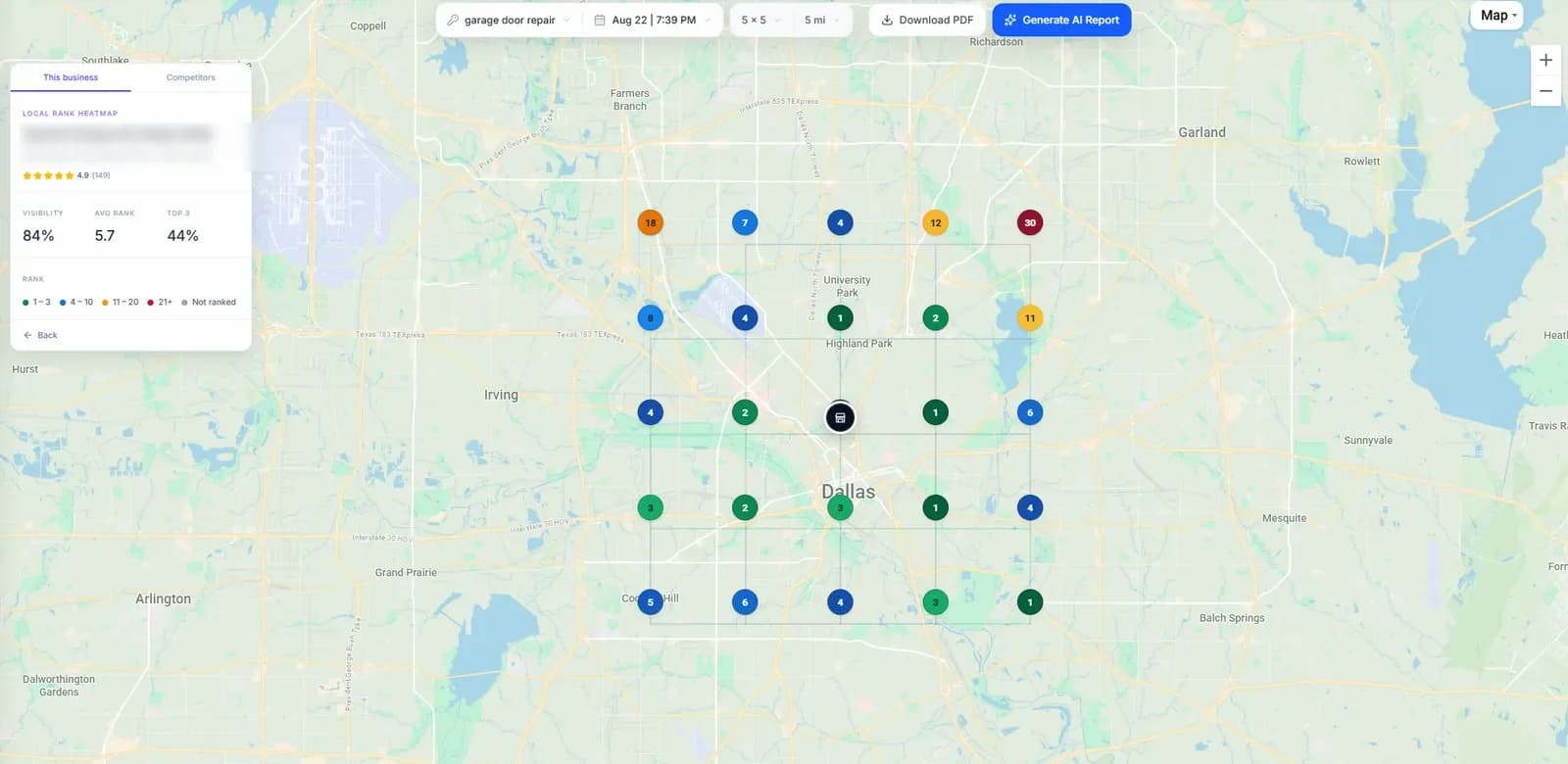
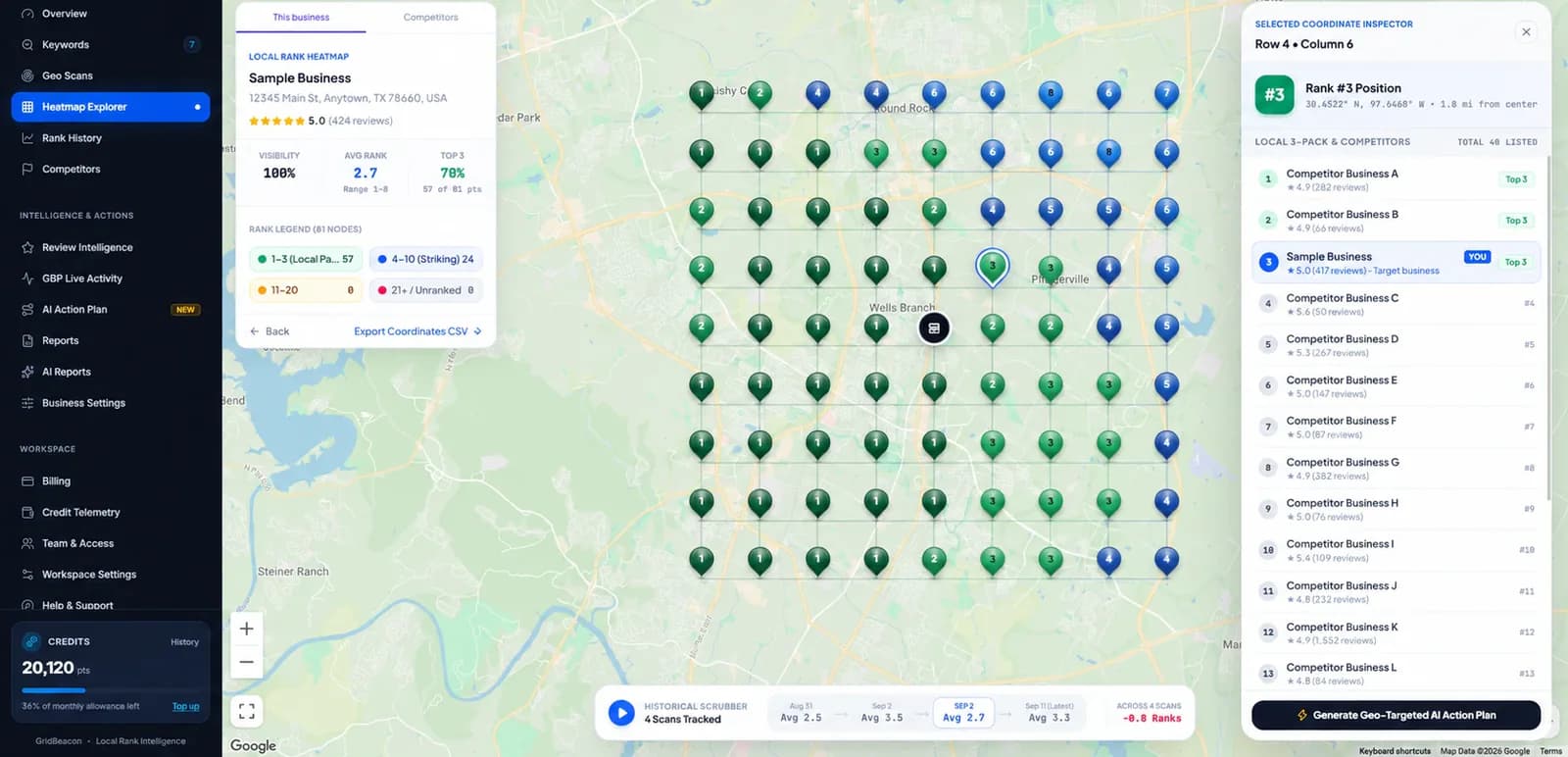
The screenshots are real GridBeacon scans of other businesses, shown as examples. When you scan your own business, look for these:
- Where the green stops: the edge of the area where customers see you in the top three.
- Which direction fades fastest: often where a strong competitor is based.
- Who holds the points you lose: select a point to see every business ranked there.
- Whether each keyword tells the same story: run the searches in the table above separately.
Run the same scan again in a week or a month, with the same centre, grid and radius, and the trend arrows show what moved.
The competition
Who Dental Practices Compete With on Google Maps
Dental map packs are crowded and local. These are the listings that usually share your grid:
Practices on the next street
In dense areas several practices sit within a mile, so a small move in distance changes who ranks.
Group practices
Multi-location dental groups with consistent branding and strong review programmes.
Specialists
Orthodontists, pediatric dentists and implant centres that compete for treatment searches.
Practitioner listings
Individual dentists can have their own profiles, which may compete with the practice listing.
New practices
Recently opened practices pushing for reviews. Watch who gains ground between scans.
Clinics outside your town
Practices patients will travel to for a specific treatment such as implants.
Multiple dentists
Practice Listings, Practitioner Listings and Multiple Locations
Dental practices often have more than one listing in play. Track them deliberately so you know which one Google is showing:
Track the practice listing first
It's usually the one you want patients to find. Add it by pasting its Maps link.
Check practitioner listings
If an individual dentist's listing appears in your grid, you'll see it in the point inspector alongside the practice.
One business per location
Each location is its own listing with its own grid; paid plans have no limit on businesses.
Compare locations
Use the same keywords, grid and radius at each location so you can compare them fairly.
Diagnosis
Common Google Maps Ranking Problems for Dentists
What a geo-grid usually shows when something is wrong, and where to look first. These are starting points, not guarantees.
| What the grid shows | Common cause | Where to look first |
|---|---|---|
| Strong outside the door, weak a mile away | Dense competition: another practice is closer to those patients | Reviews and treatment content to compete beyond your immediate area |
| Visible for “dentist”, absent for implants or cosmetic | The profile doesn't signal those treatments | Services, relevant secondary categories, before-and-after photos, treatment pages |
| A specialist wins most treatment searches | Their profile matches the treatment more closely | Whether that treatment is worth a dedicated push |
| Two of your own listings in the results | Practice and practitioner listings both showing | Which listing ranks where, using the point inspector |
| Sudden drop across the grid | Profile edits, a category change or a suspended listing | Recent changes to the profile and its status on Maps |
FAQ
Rank Tracking for Dentists: Questions
How do I check my dental practice's ranking on Google Maps?
A geo-grid scan checks your ranking from many points around the practice at once. GridBeacon's free checker runs a 3 × 3 grid; a free account includes 500 credits for a 7 × 7 or larger grid.
What grid size should a dentist use?
A 7 × 7 grid with a 1–3 mile radius in a city, or 3–5 miles in a suburb. Patients rarely travel far for routine care, so a tight grid shows the real picture.
Should a dentist track treatments separately?
Yes. Implants, cosmetic dentistry and emergency care each produce their own map pack, often led by different practices. Track the treatments you want more patients for.
Why does another practice outrank us when we have more reviews?
Reviews are one part of prominence. Relevance (how well the profile matches the search) and distance from the searcher matter too. The grid shows where it happens; the profile comparison helps show why.
Can I track several practice locations?
Yes. Each location is a separate business in GridBeacon, and paid plans have no limit on businesses or keywords.
See Which Practices Patients Find First
Scan your practice and its main treatments street by street with 500 free credits.
No credit card required.